Asking your knowledge
Four ways to bring a context into a chat, how citations work, and how to tell when an answer is thin.
Knowledge is only useful when it reaches the answer. This page covers how a context gets attached to a turn, what you see when it is used, and how to tell when the answer is running on thin material.
Four ways a context reaches a chat
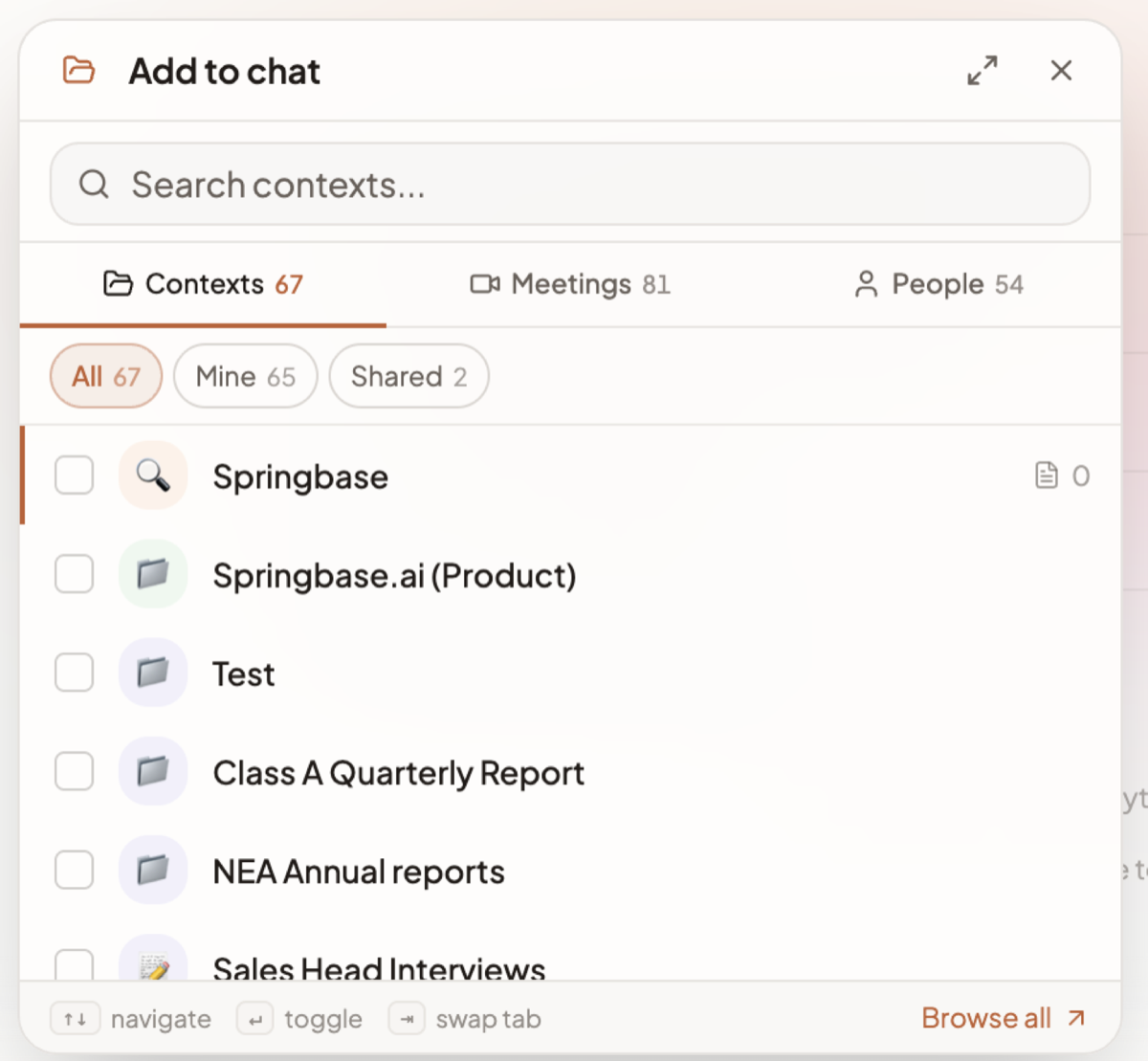
1. The Add context button. In the composer, click Add context. A dialog titled Add to chat opens, with a search box ("Search contexts…") and three tabs, each carrying a count: Contexts, Meetings and People. Under them sit scope chips — All, Mine, Shared, and Team, Org or Community where you have them; a chip with nothing behind it is hidden. Tick the rows you want. A Recent strip offers up to 8 recently used contexts for one-click re-attaching, ordered by when you last queried or updated each one, not by any AI ranking. The composer button then shows a badge with how many things you have selected.
The footer lists the keyboard moves — arrows to navigate, Enter to toggle, Tab to swap tab — and Browse all takes you to the full Context workspace.
2. An @mention. Type @ in the composer and pick from the autocomplete, or type the handle
directly. Both @my-context and @"My Context Name" work. The autocomplete also offers Search all
your contexts and Search all your meetings, and marks anything you equipped from the community
with a Community tag.
3. Attached by a recipe. Recipes and saved runtime attachments carry their own contexts. When you send, those merge into whatever you had selected. Contexts from the community are equipped for you first, and you get a toast if any of them could not be.
4. Auto-routing. Attaching a context does not force retrieval. A router looks at your question and decides, per source, whether to use, skip or treat it as uncertain, and picks how broadly to search. This is why a chitchat message with a big context attached does not trigger a document search. Routing has three modes — automatic, always retrieve, or never — so you can pin the behaviour if the default is guessing wrong for you.
What @contexts does
@contexts is not a context. Typing it — or @context — turns on "search across all of my
contexts" for that one turn, so you can ask a question without knowing which folder holds the answer.
It resets afterwards. There is an equivalent for meetings, picked from the autocomplete as Search
all your meetings. This is why context, contexts, meeting and meetings are
reserved slugs and cannot name a context of your own.
Citations
When documents are used, the answer cites them by number — [1], [2] — and a collapsible
Sources (n) list appears underneath. Three are shown by default; expand for the rest.
Clicking a citation opens the context detail page scrolled to the exact document and the passage inside it that was quoted, so you can check the claim against the original rather than trusting the summary.
Citations only cover retrieved passages. Reasoning the model added on top of them is not cited, so a sentence without a number is the model's, not your document's.
When answers degrade, and how you can tell
Springbase tries to show you when it is on thin ice rather than answering confidently from nothing.
- Amber spinner on a context chip. The chip in the composer shows a pending count with the tooltip "N documents still being indexed — not searchable yet". Those documents will not appear in the answer no matter how you phrase the question. Wait for them to reach Ready — see Adding documents.
- A quiet hint on the sources chip. Retrieval found something, but the match was weak. Take the answer as a starting point and open the sources.
- A louder banner. Retrieval only matched on document titles and metadata, not on content. This usually means the material is not really in the context, or the question uses vocabulary the documents never use. Rephrase with the words your documents actually use, or add an instruction mapping your terms to theirs.
Heads up: an unanswerable question is supposed to come back as "I could not find that in your documents". If you get that on material you know is there, check the document is Ready and that the context is actually attached before assuming retrieval is broken.
Deep analysis
Deep analysis is a wider scan over a whole context, rather than over the best-matching passages, and it is a Max plan feature.
The toggle that turns it on is not shown while a chat is running on Auto — Auto reads what it needs by itself, so the manual control is hidden. It appears only where the composer has left the Auto turn engine. That means most people on this build never see it, and the practical advice is to ask the question normally and let Auto decide how widely to read; see How Auto works.
Where it is reachable, its behaviour is worth knowing:
- It consumes credits, and a toast tells you the charge.
- It runs before the send, showing progress as a thin line along the composer's top edge, and you can cancel it while it runs.
- It needs everything indexed. If any selected context still has documents processing, it will not start.
- It fails soft. If the scan overruns, your question is answered with standard context analysis and the completed scan is reused next time you ask — you are not billed for it twice.
- Below Max it is not available at all. You get told the request would benefit from Deep analysis but that your plan does not include it, and the answer comes back from standard analysis.
Related docs
A Context is a named, reusable folder of knowledge you can pull into any chat with its @handle.
Every way to get content into a context, the file types that work, and the three size limits that compound.
The composer control by control, what an answer can contain, and the actions under every reply.