Automations
Run a recipe on a schedule, after a meeting ends, or when an app fires an event — and understand why unattended runs never send anything.
Automations need a Pro or Max plan. On any other plan the Automations page shows an upgrade screen instead of the builder. Signed-out visitors are asked to sign in.
An automation runs a recipe without you being there: something happens, the
recipe runs, and the result lands as a chat you read later. The old /schedules URL redirects here —
schedules are the Time-based tab, not a separate feature.
The three trigger families
| Fires when | Best for | Cap | |
|---|---|---|---|
| Time-based | A clock reaches a time you set | Daily digests, weekly reports | 10 schedules |
| Post Meeting | A recorded meeting finishes processing | Follow-ups, action-item write-ups | 10 rules |
| App Events | A connected app emits an event | Triage, first-pass drafts, routing | 10 rules |
Each family has two views: Rules (what you set up) and Runs (what happened).
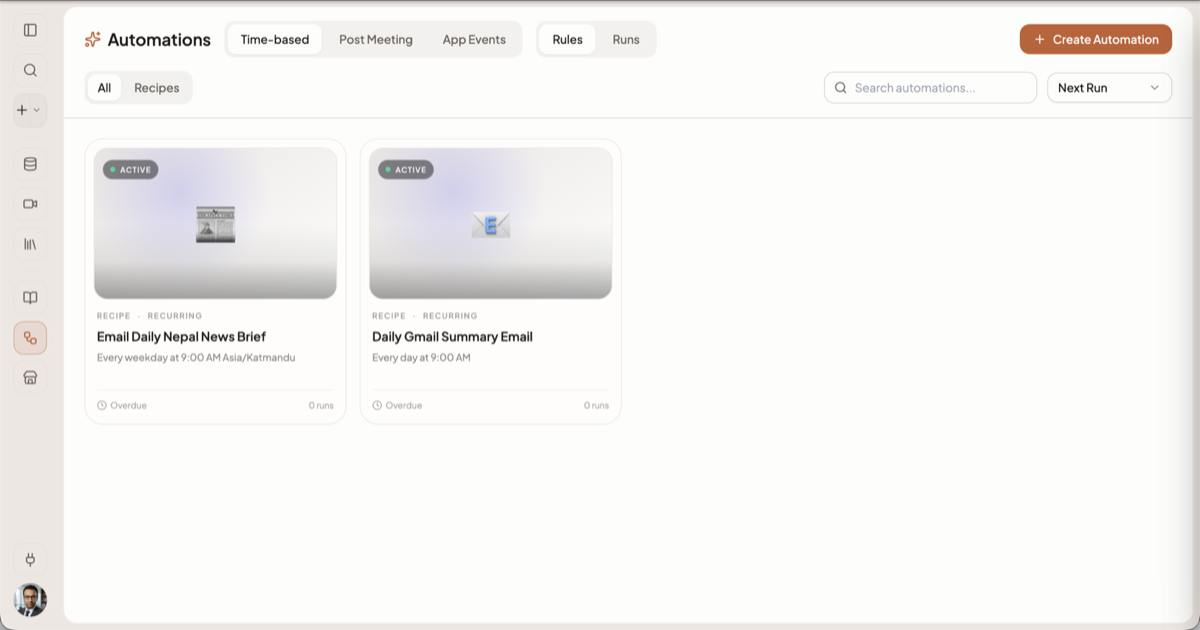
Creating one
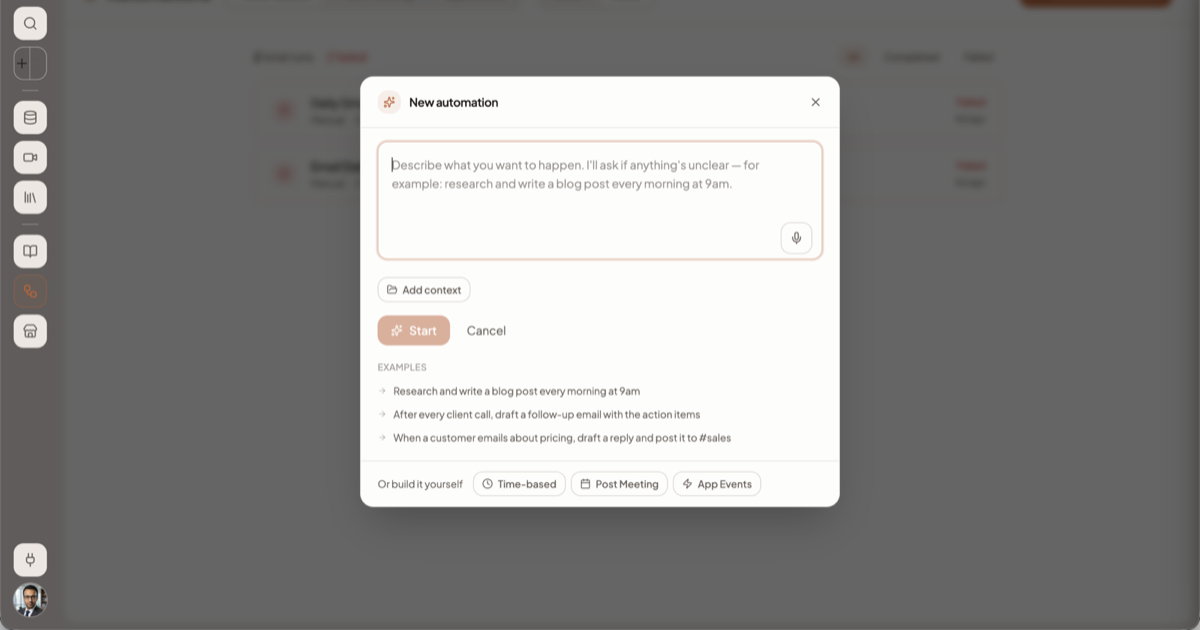
Click Create Automation, top right. The dialog that opens is titled New automation and leads with an AI composer, not a chooser: one box, prompted "Describe what you want to happen. I'll ask if anything's unclear — for example: research and write a blog post every morning at 9am." Three worked EXAMPLES sit under it, an Add context button beside it, and a dictation mic inside it.
Describe the job in a sentence and click Start. It works out which trigger family you mean and writes a fresh recipe for it. It never offers an app you have not connected, it reports the assumptions it made, and you can cut the questions short by telling it to "just build it". It always writes a new recipe rather than reusing one from your library.
To build by hand instead, use the footer row: Or build it yourself — Time-based, Post Meeting, App Events.
Time-based
Pick a recipe, then type the schedule in plain English — "Every Tuesday at 3pm" — or take one of the presets. Springbase shows what it understood plus the next three times it will fire, so you catch a misread before saving.
Set the Timezone — it defaults to your browser's, and the schedule follows that zone, not UTC. Then fill in the recipe's inputs. Those values are frozen: every run uses them until you edit the schedule. You get 10 active schedules, and scheduling an agent-workflow recipe needs a paid plan.
Post Meeting
A Post Meeting rule watches for one thing: a meeting completing. Recipes are the only target.
- Choose which meetings count. Structured matching filters on specific meetings, words in the title, the platform, or the connected calendar the meeting came from. Smart matching takes a natural-language condition — "client meetings or sales calls" — and has a model decide per meeting, recording what it decided and why.
- Map the recipe's inputs onto the meeting: title, summary, transcript, action items, decisions, key topics, platform, participants, date, attendee emails, organiser email, the full meeting context, or a fixed value.
- Set a delay — immediately up to 7 days, with presets at 10 and 30 minutes, 1, 2 and 6 hours, 1 day and 7 days. Mark the rule one-time if it should deactivate after its first match.
Rules can be dry-run against existing meetings before you save.
Heads up: smart natural-language matching is a paid-plan feature. On a free plan the Smart option is disabled in the builder and refused by the server; structured filters still work.
App Events
App Events cover 12 apps: Gmail, Slack, GitHub, Google Calendar, Notion, Linear, Outlook, Google Drive, Zendesk, Trello, Typeform and YouTube — a hand-picked list, not the whole marketplace. Connect the app first — see Connected tools.
Pick the app and the trigger to listen for. Add field filters if the trigger is noisy: each tests one field in the event for exists, equals or contains (Gmail suggests subject, sender, body and label). Set the cooldown — the minimum gap between runs — and the daily limit. Each app ships its own defaults; Gmail, for example, starts at a 300-second cooldown and 25 runs a day. Then bind the recipe's inputs to fields in the event, or to fixed values.
Filters apply first, then cooldown, then the daily limit, and repeat deliveries are de-duplicated, so a webhook fired twice runs your recipe once.
Run now replays pending events only. With nothing queued you get "No pending events — this automation runs when a new event arrives." It is not a way to test a rule against nothing.
What a run produces
Every automation, in every family, produces a chat: titled after the recipe and the date, with the recipe's contexts already attached, and filed into a folder for that specific automation. It is hidden from your sidebar recents until you reply to it — the moment you send a message there, it surfaces like any other chat.
The Runs view lists each run with its status, the error message when one failed, and a link to the chat. Statuses are pending, running, completed, failed, cancelled and skipped — and skipped is not a failure; it means the run was deliberately not carried out. A counter at the top of the view totals the runs and the failures ("2 total runs · 2 failed"), and All / Completed / Failed narrow the list.
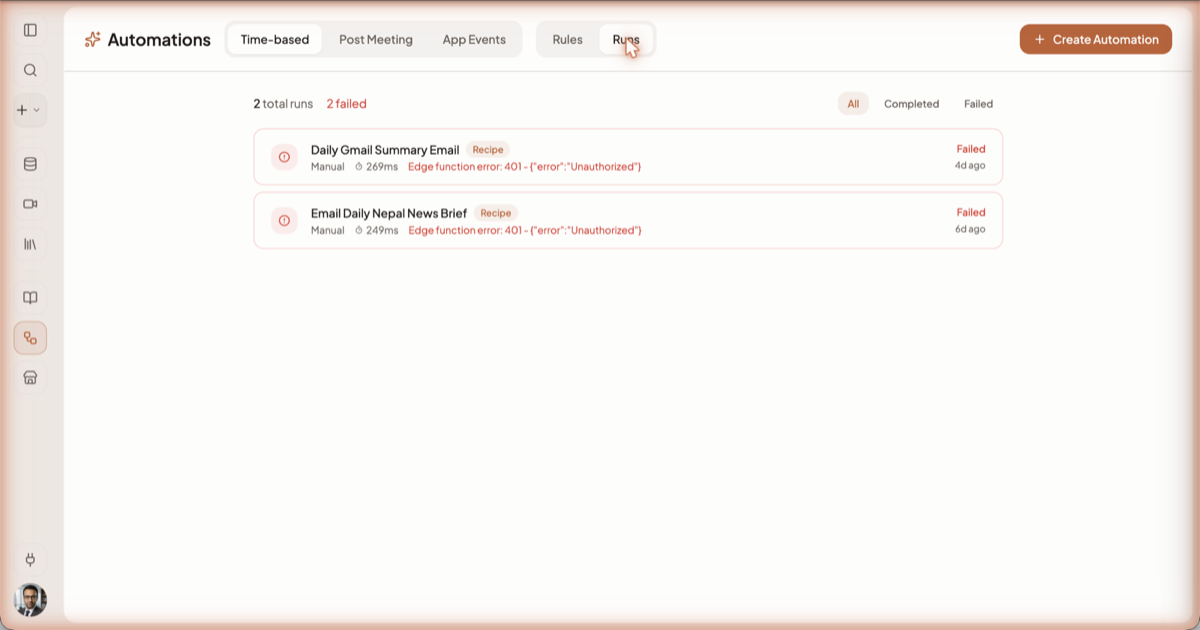
If a schedule keeps failing, Springbase pauses it and notifies you once. The pause records whether you, the circuit breaker, or revoked access stopped it, so a paused automation always says why. Evaluation history is kept for 14 days.
The big limitation: unattended runs cannot act outside Springbase
A scheduled or triggered recipe will not send an email, post to Slack, create a ticket or write to a CRM. Every tool that changes something outside Springbase is withheld from a background run.
The reason is that an unattended run has nobody present. In a chat you are there to see what the turn did, and to stop it; a background run at 6am has neither. Rather than acting on your behalf with nobody watching, Springbase removes those tools and tells the model which ones were withheld and why. That is what keeps the output honest: a run that could not send the email says so, instead of reporting a success that never happened.
Unattended, an automation can still read and reason over your contexts and meetings, research, write, and generate images, voiceovers and music. If you want the email actually sent, open the chat the run produced and send it from there.
Background runs also never stop to ask a clarifying question — where an interactive turn would ask, they make the stated assumption and carry on.
Related docs
Save a prompt you keep retyping as a reusable recipe with fill-in-the-blank inputs, then run it from chat in two clicks.
Connect Gmail, Slack, Notion and hundreds of other apps, and understand what Springbase is then allowed to do in them.
What Springbase produces once a call ends — summary, decisions, action items, participants — and how to ask questions about it in chat.