Overview
What Springbase is, how the pieces fit together, and what you see the first time you sign in.
Springbase is one chat box with a lot behind it. You type what you want; it works out what that message needs — reading your own documents, searching the web, making an image, writing and running real files — and does it inside a single turn. Around that chat sit the places where your material lives: your knowledge, your meetings, the prompts you re-run, and the jobs that run without you. It is not a suite of separate apps you switch between. Almost everything is reachable from the composer.
The mental model
Three ideas carry the whole product.
You talk to it in one place, and it decides. There is no mode menu to get right. The composer runs Auto: the model is handed the tools and picks what to do at each step of your turn — search, read, build, generate, call a connected app — and you watch it happen. What you do control is how much to spend on the models it reaches for, with the effort selector next to it. See How Auto works and Models and effort.
You can give it your own material. Files you attach to one message are gone after that
conversation. Material you put in a Context stays, gets indexed, and can be pulled into any chat
by its @handle — so the answers cite your documents instead of the internet. See
Contexts.
You can make work repeatable. A prompt that worked once becomes a Recipe. A Recipe that should run on a schedule, after every meeting, or when an app emits an event becomes an Automation. See Recipes and Automations.
The building blocks
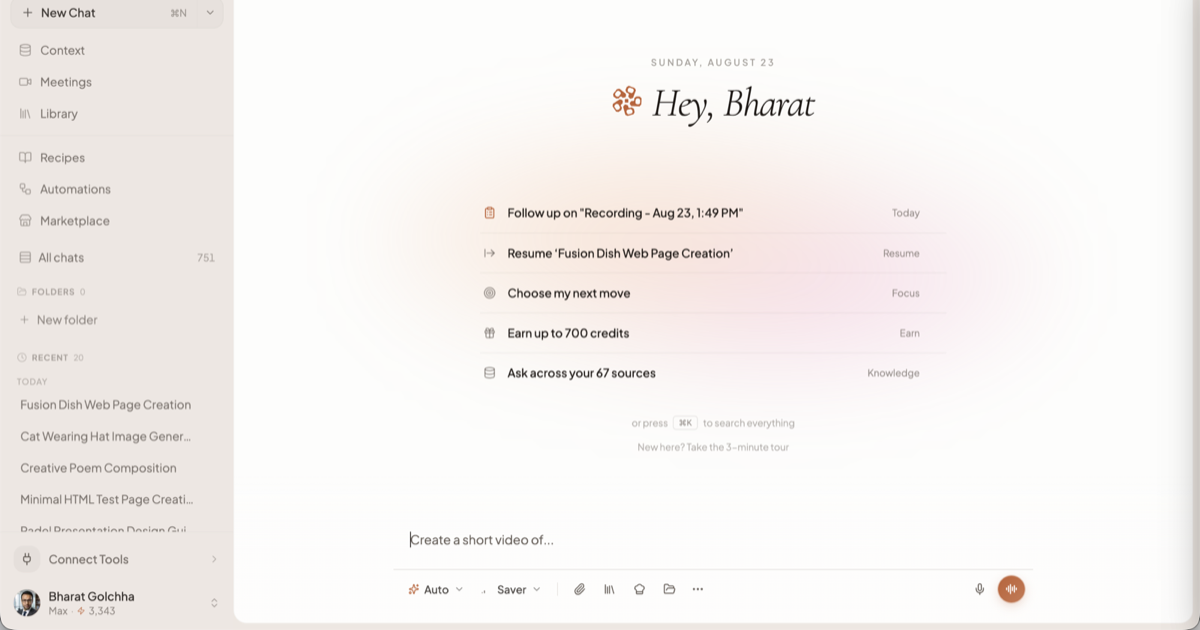
Chat
The composer is the front door. You type, attach up to 10 files, pick an effort, optionally arm a one-turn intent (Image, Video, Music, Research, Build, Deck), and send. Answers carry inline citations, an activity block showing what ran, and follow-up chips. Start at Chatting with Springbase, then Files and attachments and Organising your chats.
You can also talk instead of typing — dictation into the composer, or a live spoken conversation where the assistant can start real tasks for you. See Voice. And if you keep giving the same standing instructions, write them once as a Skill and let the assistant load them when a task matches.
Contexts
A Context is a named, reusable folder of knowledge: documents, notes, pasted text, and optionally
live sources that keep feeding it. It has an @handle, per-context reading
instructions, and its own sharing settings. Contexts are what make
Springbase answer from your material rather than general knowledge. See
Contexts, Adding documents,
Asking your knowledge and Sharing a context.
Live sources connect a web page, sitemap, RSS feed, YouTube video, or an account like Google Drive, Notion, Slack or Gmail, and add new items to a context on a schedule. They need Pro or Max — see Live Data.
Library
The Library is your file and media shelf: everything you uploaded in chat, everything the assistant generated for you, and anything you upload directly. It is storage, not knowledge — items here are not searched when you ask a question. You reuse one by clicking Choose from Library in the composer. See Library.
Meetings
Springbase can send a notetaker bot into a Zoom, Google Meet or Microsoft Teams call, record from your browser or from the Mac app, take an audio upload, or accept a pasted transcript. What comes back is a transcript with named speakers plus a summary, action items, decisions and key topics that you can then ask questions about. See Capturing a meeting, After the meeting and The Mac app.
Recipes
A Recipe is a saved prompt with named inputs. You fill in the blanks and run it, instead of rewriting the same instructions. Recipes can carry contexts, produce chat answers or media, be shared by link, and be the thing an Automation runs. See Recipes.
Automations
An Automation is a trigger attached to a Recipe. Three triggers exist: Time-based (a schedule), Post Meeting (when a meeting finishes), and App Events (when Gmail, Slack, GitHub and others emit an event). Every run produces a chat you can open and read. The whole Automations surface needs Pro or Max. See Automations.
Connected tools
Connecting an app — Gmail, Slack, Notion, Linear, Drive and many more — lets the assistant act in it during a turn: read a thread, file an issue, draft a message. It can do that without stopping to ask — a confirmation card appears for some actions, but not for every change it makes in a connected app. Connect what you want it to use, and disconnect what you would rather it did not touch. See Connected tools.
Canvas and artifacts
When a turn produces something you can open rather than read — a document, a deck, a page, a small app — it becomes an artifact, and Canvas is the editor beside the chat where you preview it, edit it, see its version history and export it. See Canvas and artifacts and Building pages and apps.
Alongside those, the assistant can generate images, video and music (Images, video and music) and run genuine multi-source web research (Research).
What a new account looks like
There is no signup wizard on this build. You sign up, you land on the home screen, and the composer is already waiting.
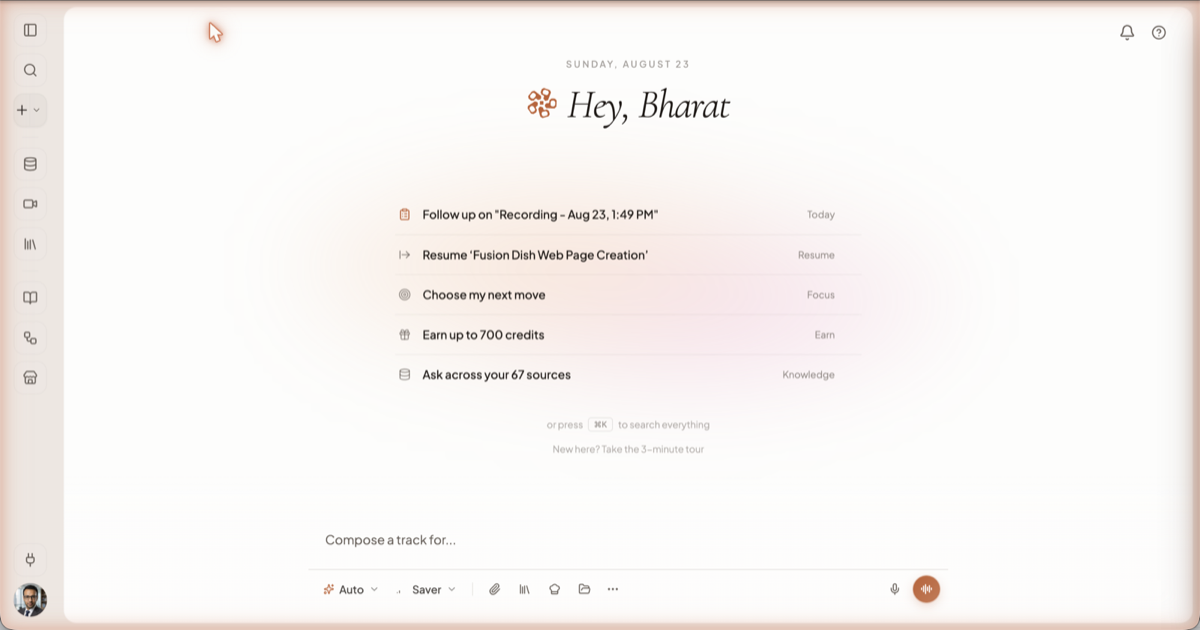
The home screen shows:
- A greeting — "Hey, <your first name>".
- Up to five suggestion rows — your last chat, recent meetings, upcoming calendar events, your contexts, and quests you have not finished, ranked so the most live one is at the top. Click a row to pick up where you left off.
- A search hint — "or press ⌘K to search everything". ⌘K (Ctrl+K on Windows) searches chat titles and message content.
- A link: "New here? Take the 3-minute tour" — a click-through product tour. It is a recorded walkthrough, not a coach-mark tour of your own account, so nothing in your workspace changes while you watch it.
Your new account starts on the Free plan with a starting credit balance. The floating ? button in the top-right opens the Help Coach, which lists questions under ON THIS SCREEN and POPULAR, and the account menu at the bottom of the sidebar has Earn credits, which lists one-off quests that add to your balance. See Plans and credits.
What Springbase will not do
Worth knowing before you plan around it:
- A document is not searchable until it finishes indexing. Freshly uploaded files show a spinner, and answers will say so rather than pretend.
- Automations, and Live Data sources, need Pro or Max. Recipes themselves do not.
- An automated run will not write to your connected apps. A scheduled or triggered Recipe can read, think and produce a chat, but every external write tool is withheld from an unattended run — it tells you what it could not do instead of doing it. Only an interactive turn — one you are present for — can send the email.
- The notetaker bot joins Zoom, Google Meet and Microsoft Teams only. Any other link is refused.
- You cannot publish a Context to the public marketplace yourself. Sharing is by link, team or organisation.
Where to go next
- Quickstart — the first 20 minutes, as four exercises.
- Key concepts — the vocabulary, in one page.
- Chatting with Springbase — everything in the composer.
- Contexts — put your own material in.
- Capturing a meeting — get your calls in.
- Recipes — stop retyping prompts.
- Plans and credits — how usage is metered.
- Settings — theme, personalisation, defaults, data export.
- Marketplace — recipes and contexts other people published.
- Troubleshooting — when something looks stuck.
Or follow one of the guides end to end: Build a team knowledge base, From meeting to follow-ups, Build and publish a page.
Related docs
Four exercises, about twenty minutes: run a real turn, ask your own documents, save the prompt as a Recipe, and get actions out of a meeting.
Every word the rest of these docs assumes you know — Auto, intents, effort, credits, Contexts, Skills, Recipes, Automations, artifacts and visibility.
Auto is the only mode. The model decides what to do at each step instead of a router classifying your message up front.