Settings
A walkthrough of Profile settings — Account, Customization, AI Defaults and Usage — and everything else in the account menu.
Everything you can change about your account lives in one place: Profile settings, reached from the account button at the bottom of the sidebar. There is no separate "Settings" item — if you are looking for a preference, it is on one of the four tabs below.
Getting there
- Click your name and avatar at the bottom of the sidebar.
- Choose Profile settings.
- Pick a tab: Account, Customization, AI Defaults or Usage.
A sticky Back to Chat link sits above the tabs. On narrow screens the tab labels collapse to icons.
Account
The identity card at the top shows your avatar, name, plan badge, email, the date you joined and your credit balance.
- Change photo (or Upload photo if you have none) opens a picker that also accepts a drag and drop. Maximum 2 MB, in JPEG, PNG, GIF or WebP. Remove photo appears only once a photo exists, and asks you to confirm — the image is deleted permanently and your initials come back.
- About you holds Display name (up to 50 characters) and Bio (up to 500). These appear on recipes you share, so they are not private. Press Save — the button stays disabled until something changes.
Below that, Account & data:
| Row | What it does |
|---|---|
| Export my data | Downloads everything Springbase holds about you as a single JSON file. Available once per hour — ask again sooner and it tells you how many minutes to wait. |
| Sign out | Signs out on this device only. |
| Billing address | Appears only if you pay through Razorpay and already have an address saved. Edit opens the Billing details dialog. |
A Chrome Extension section lists the browser sessions connected to your account, each with its browser, version and last-seen date, and a Revoke button.
Danger Zone is collapsed by default and holds two irreversible actions: Delete All Chats (recipes and contexts survive) and Delete Account. Both make you type an exact confirmation phrase before the button turns on.
Customization
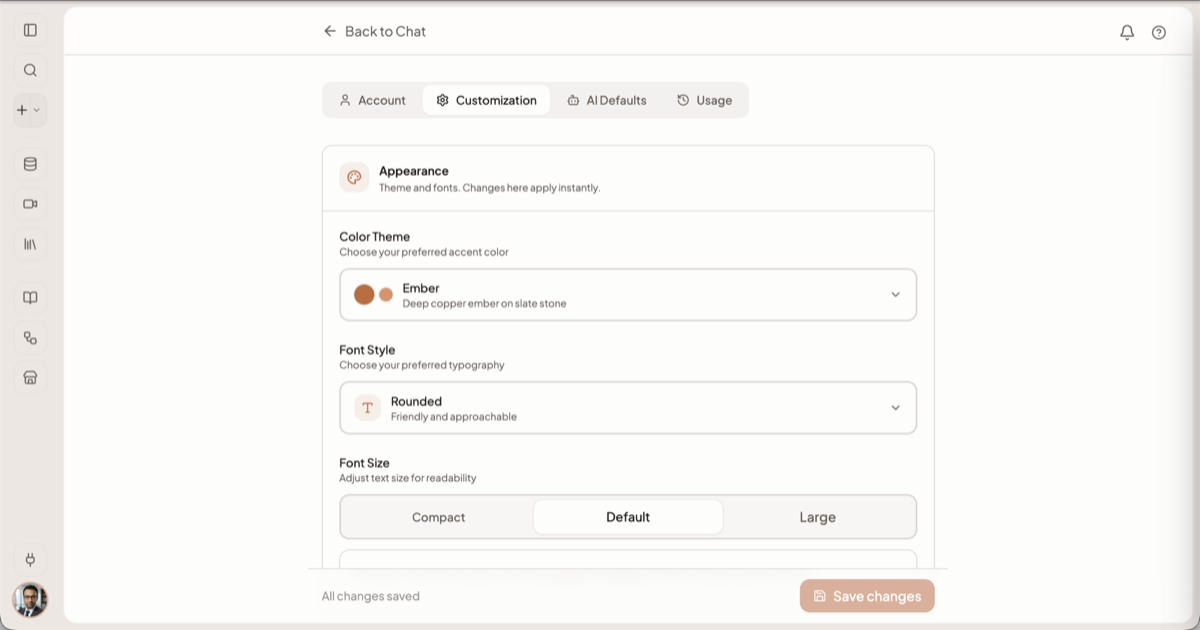
Appearance changes apply instantly and are not covered by the save bar at the bottom of the page.
| Setting | Choices |
|---|---|
| Color Theme | Graphite, Midnight, Sage, Gold, Ember |
| Font Style | Modern, Classic, Rounded |
| Font Size | Compact, Default, Large, with a live preview line |
Personalization is how Springbase talks to you across every chat:
- What should Springbase call you? — the same field as Display name on the Account tab.
- What do you do? — one line, up to 100 characters.
- What traits should Springbase have? — pick up to 10 from Friendly, Professional, Witty, Concise, Detailed, Casual, Formal, Encouraging, Direct and Patient.
- Anything else Springbase should know about you? — up to 3,000 characters of interests, values and preferences.
Live mode voice sets the default voice for realtime conversations, with a Preview button per voice. An Experiments section holds a single toggle for a feature that is past its removal date; leave it off unless you were told otherwise.
Unlike Appearance, Personalization and voice need the sticky Save changes bar at the bottom.
AI Defaults
Every chat runs on Auto, which works out what each message needs. This tab is where you say how much to spend on the models it reaches for — the same four-position dial as the effort chip in the composer (Saver, Balanced, Max, Custom), but as your standing default for every new chat on every device rather than for this one conversation.
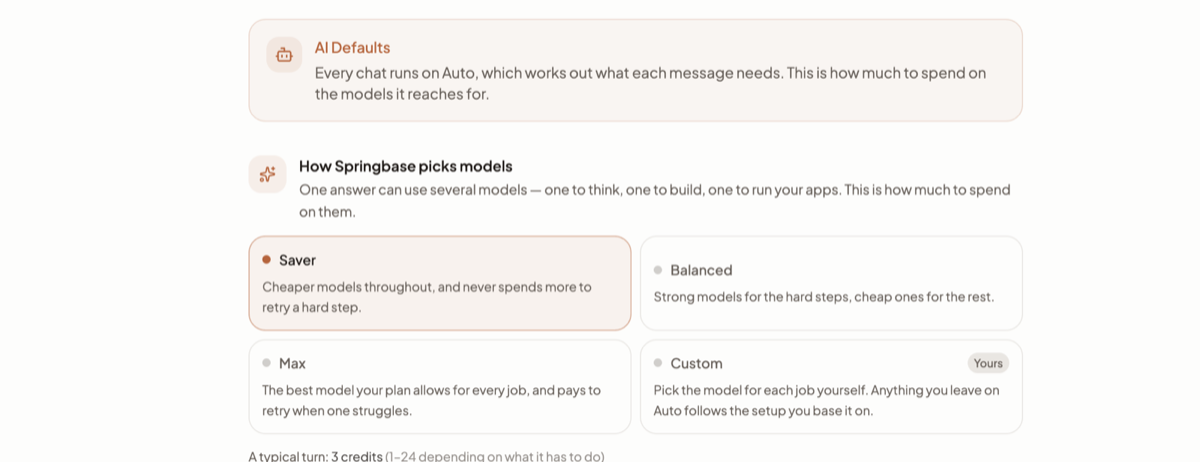
Each card shows an estimate of what a typical turn costs at that setting and the models it would actually use. Expanding the disclosure below the dial shows the per-job breakdown — your main model, the builder, the model that runs connected apps, and the one that rescues a stuck turn — plus a Media block for Images, Image edits, Video, Speech and Music. Those controls only accept changes on Custom. Models and effort explains what each position and each job actually does.
Recommendation preferences holds two switches: Prefer favorited models ranks models you have favourited higher, and Allow fallbacks lets Springbase route to the next eligible model when your preferred one is unavailable. Finish with Save AI defaults.
Heads up: this whole tab is a paid feature. On Free it is replaced by an upsell reading AI Defaults are locked on Free, and no controls render. Pinning your own models per job needs Pro or Max.
Usage
Your credit balance, what your plan covered, and every transaction. See Plans and credits for what each figure means.
The rest of the account menu
The button that opens it sits at the bottom of the sidebar and shows your name with your plan and current credit balance under it — "Max · 3,330".
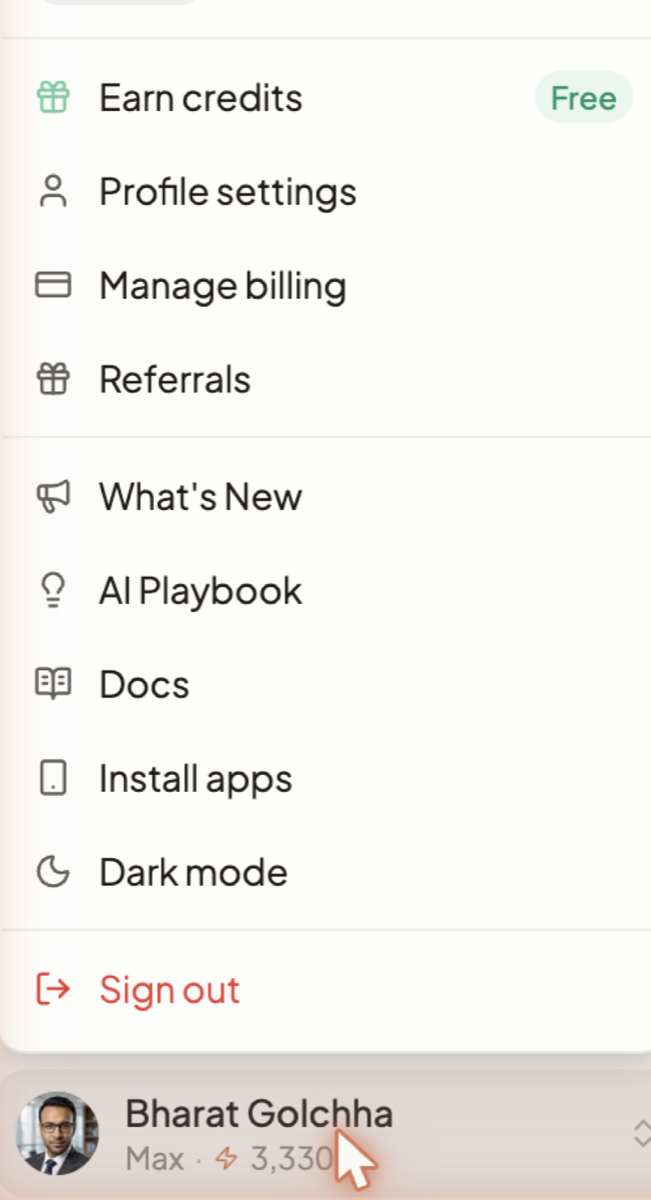
| Item | What it opens |
|---|---|
| Earn credits | The quest panel — jobs that award credits. Shown to everyone, paid included. |
| Profile settings | The four tabs above. |
| Upgrade plan / Manage billing | Billing. Which one you see depends on whether you already pay. |
| Referrals | Your invite link, referral stats and milestones. |
| What's New | A side panel of recent changes. The account button carries a dot while there are unread entries. |
| AI Playbook | Not a help centre — you describe a goal and it writes you a personalised playbook of steps, recipes and tools. Playbooks can be saved and shared. |
| Docs | This documentation, in a new tab. |
| Install apps | The download hub for the Mac app, the iOS app and the Chrome extension. |
| Light mode / Dark mode | Switches theme immediately. |
| Sign out | Ends the session on this device. |
Two absences worth knowing about: there is no setting for which mode a chat starts in — Auto decides per message — and there is no support link in the signed-in menu. For help, use the ? button or AI Playbook; see Troubleshooting.
Related docs
How credits are spent, why one answer costs more than another, where to see your balance, and what each plan unlocks.
Saver, Balanced and Max are ready-made setups. Custom is the only one where your own model choices take effect.
The problems people actually hit — stuck documents, answers that miss, disconnected apps, silent automations — and what to do about each.