Building pages and apps
The Build intent makes a working project — files written, checked and handed back — instead of describing one. Plus Deck, exports and hosted sites.
Build is a one-turn intent that changes what the turn owes you: the outcome is a working artefact, not a description of one. Springbase writes the files, runs a check over them, repairs what is broken, and hands you something that opens.
Arming Build
- Click the Auto ▾ chip in the composer.
- Under For this message, choose Build.
- Type what you want and send.
Starting your message with /build does the same in one action: the intent arms and the rest of the
line is sent.
Build is armed for exactly one message. Sending clears it, and picking Build again disarms it. It carries no plan gate — every signed-in account can use it.
What a Build run looks like
Build turns are long and visible. While it works you get a live checklist of steps with the current one pulsing, an activity block naming the tools that are running, and an assets floater showing what the turn is making while it makes it. The plan floater lets you hold the run, let it continue, or amend a step mid-flight.
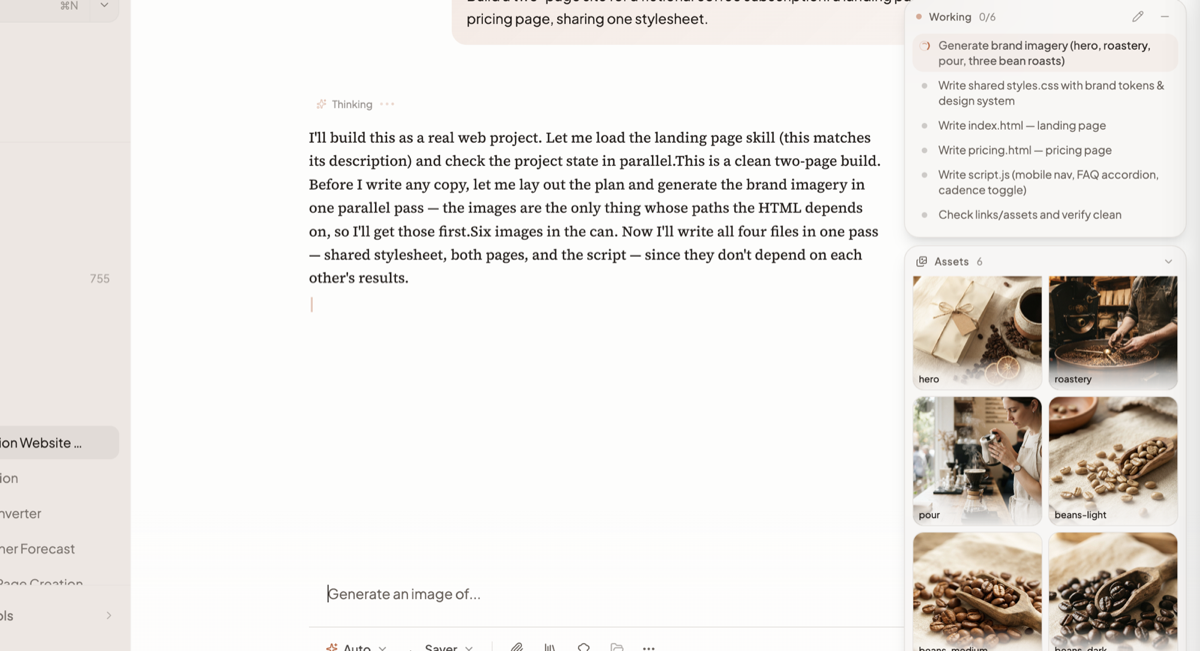
Heavier runs follow a fixed outline — build the complete project, validate and repair it, package the verified result — and only finish once validation passes. A production check runs at the end; if it fails, a repair loop runs before you see anything. A verification report is attached to the version that results.
Heads up: a turn is capped at 20 minutes. A very large project can hit that ceiling. Ask for the first working version, then extend it in follow-up messages rather than describing everything at once.
What it can build
| Project kind | What you get |
|---|---|
| Static website | HTML, CSS and assets you can publish as a site |
| React + Vite application | A working front-end app project |
| Presentation deck | A deck, exportable to PowerPoint |
| Document | A written document, exportable to Word or PDF |
Where the output goes
This is the part people get wrong. Three different things come out of a Build turn and they land in three different places.
| What it is | Where it lands |
|---|---|
| Finished documents (PDF, DOCX, PPTX) | Chat attachments — this is the deliverable you download |
| Generated images, audio and video | Inline in the reply and registered in your Library |
| Source files (HTML, CSS, JS) | Not attached. The project persists; you open it in Canvas |
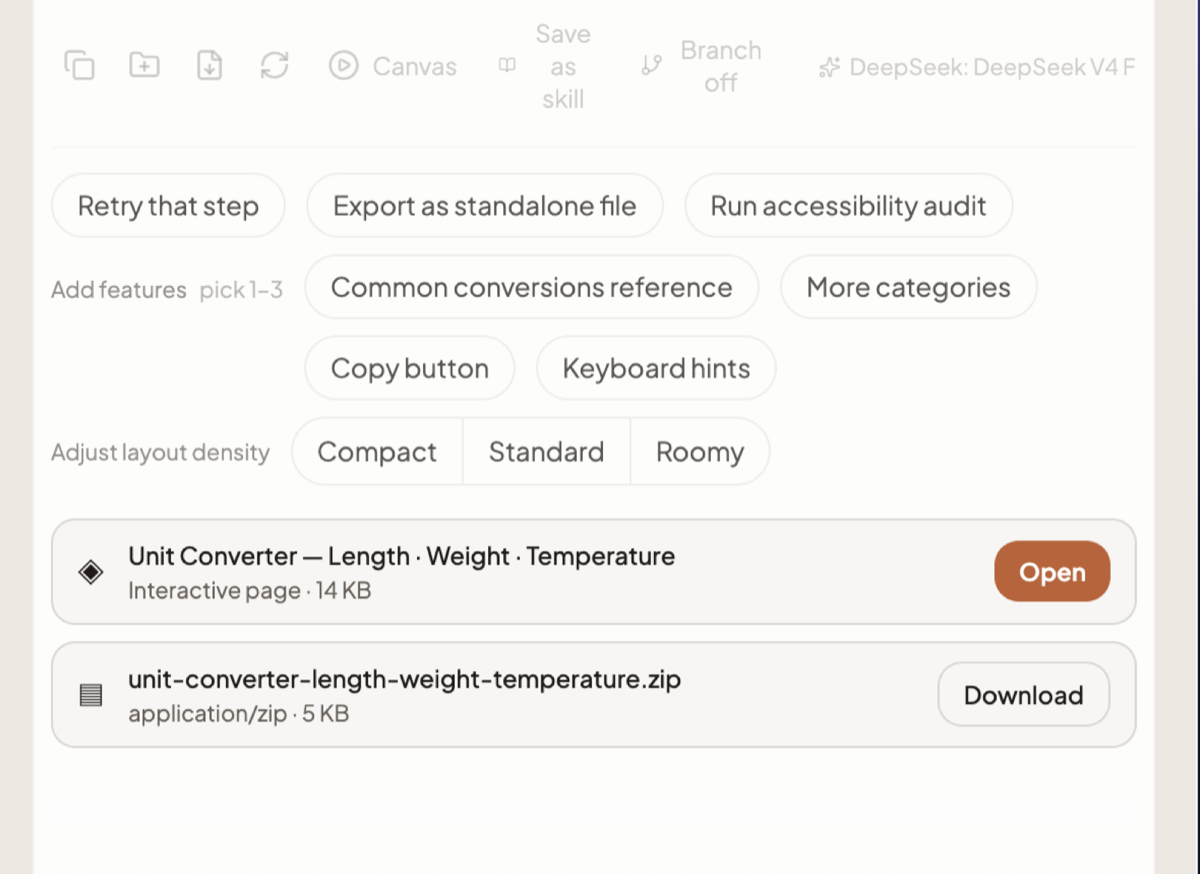
Deliverables arrive as cards under the answer, each naming what it is and how big it is: an interactive page ("<name> · Interactive page · 14 KB") with Open, and its source as a zip ("<name>.zip · application/zip · 5 KB") with Download. Canvas opens beside the chat with a Draft pill in its header.
While the turn runs, a panel headed Working n/N floats top right with the step list and a spinner on the current step.
Editing an existing build
Ask for a change in the same chat. Springbase restores every file of the current version and applies targeted edits to them — it does not start over. Each accepted change becomes a new numbered version of the project, so earlier builds stay available.
Exporting to PDF, Word or PowerPoint
Springbase renders the export itself; you never have to open the project and export it by hand. Ask for the format you want and it is produced from the built page.
Whether you get a deck or a document is decided by what the page actually looks like, not by the word you used — a page with slide structure exports as slides.
Heads up: an export is always best-effort. The guaranteed deliverable is the verified project. If a conversion fails, Springbase tells you and the build still stands — you keep the project even when the .pptx does not arrive.
Publishing a build as a site
A finished build can be published at its own web address. Open the publish dialog from the project and claim an address — 3 to 63 lowercase letters, numbers and hyphens, with reserved addresses refused. By default the site follows your builds, so every new build republishes it; Freeze pins it to the build it is serving right now.
Publishing is a paid feature, and how many sites you can keep live comes from your plan. Over the limit, publishing is refused with "Publishing hosted sites requires a paid plan." or "Your plan allows {n} hosted site(s)."
For the whole flow — the address rules, freezing, restoring an earlier build and unpublishing — see Build and publish a page.
The Deck intent
Deck is a sibling of Build with the same mechanics — one turn, no plan gate, same
Auto ▾ menu, and /deck as its shortcut. It also has a tile in the Create row on the home screen, which Build
does not. It builds a slide deck as a document with one section per slide, then exports to PowerPoint.
Use Deck when the deliverable is slides and Build when it is a site, an app or a written
document.
Related docs
Open an answer in Canvas to see it rendered, edit it by hand or by asking, roll back a version, export it, and share it at a /a/ link.
Auto is the only mode. The model decides what to do at each step instead of a router classifying your message up front.
Every file you upload and every image, clip, track and artifact Springbase makes, in one place — with a storage meter and a way back into chat.