Skills
Reusable instructions the assistant follows — write one once, and it loads itself whenever a task matches.
A skill is a set of instructions you write once and the assistant follows whenever a task matches, on any Auto turn. "Always structure a board deck this way", "when I ask for a competitor summary, use these five headings", "our house style never uses exclamation marks" — that is a skill.
A skill is guidance, never authority. It tells the assistant how to do something. It cannot grant it a tool it does not already have, approve an action on your behalf, or widen what it is allowed to touch.
How a skill gets used
Every skill has two parts, and they cost you differently:
- The description — a short line about when the skill applies. It is in front of the assistant on every turn, because it is what the assistant matches against.
- The body — the actual instructions. It is only loaded when a task matches, so a long, detailed skill costs nothing on turns where it is irrelevant.
You do not have to arm a skill for it to fire. Matching is the normal path; arming is for when you want to be certain.
Making a skill out of a good answer
The easiest skill is one you did not write from scratch.
- Find a reply that came out exactly right.
- Click Save as skill in the action row under it.
- The Skills editor opens, seeded from that response.
- Tighten the name, description and instructions, and save.
Arming skills for one message
- Type
/at the very start of an empty draft. The launcher lists your skills and the one-turn intents together. - Pick a skill. The Auto chip changes to name it — or reads "N skills" if you pick several.
- Send.
You can arm up to three skills per message. Trying to add a fourth shows "A message can carry 3 skills. Remove one first." Armed skills are cleared as soon as you send, exactly like the one-turn intents. Only skills that are enabled and marked as user-invocable appear in the launcher.
Managing skills
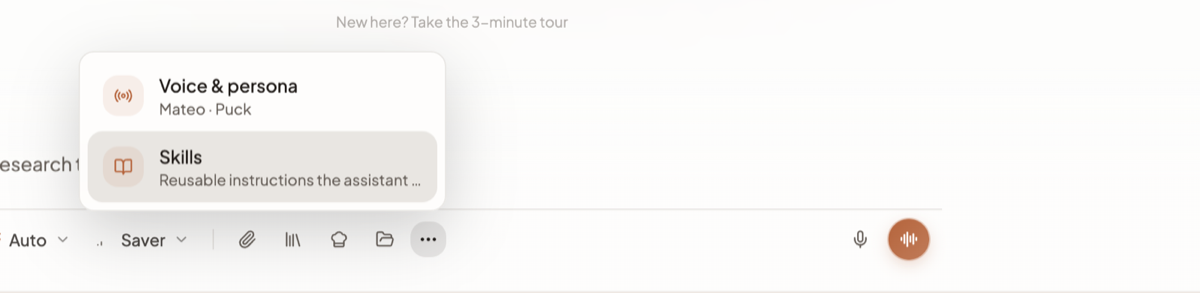
Open More options (…) on the composer and click Skills — described there as "Reusable
instructions the assistant loads when a task matches". You get a list of your skills and, behind it,
an editor.
A skill has four parts to fill in:
- Give it a name, in kebab-case, like
quarterly-board-deck. - Write the description. This is the routing signal — it is what the assistant matches your task against — so describe the situations that should trigger the skill rather than titling it.
- Write the instructions themselves. Numbered steps work well.
- Tag the capabilities the skill expects to use: Build files & pages, Images, video, audio, Run code, Schedules & recipes, Connected sources.
From the list you can enable or disable a skill, edit it, or delete it. Disabling is the reversible way to stop a skill firing without losing what you wrote.
The limits
| Limit | Value |
|---|---|
| Skills in your catalogue | 40 |
| Skills armed per message | 3 |
| Skill bodies loaded per turn | 3 |
| Description length | 20 to 1,024 characters |
| Instructions length | 20,000 characters |
| Body shown to the assistant when loaded | 8,000 characters |
| Description shown in the matching list | first 200 characters |
Heads up: a description under 20 characters is refused with an explanation rather than saved. That is deliberate — a two-word description gives the assistant nothing to match on, so the skill would sit in your catalogue and never fire.
Limits worth knowing
- A skill cannot give itself permission. The tool tags say what a skill expects to use; they do not grant access, and an action needing your approval still asks.
- Three loads per turn is a hard ceiling, whichever door they come through. A turn that matches five relevant skills will use three.
- A long body is truncated when loaded. You can store up to 20,000 characters but only the first 8,000 are put in front of the assistant, so keep the important instructions at the top.
- The Skills row only appears when Auto is running the chat. It is not available in a session that has left the Auto turn engine.
- A skill is not a recipe. You never "run" a skill — it loads itself when relevant, while a recipe is a job you launch with inputs you fill in.
Related docs
The composer control by control, what an answer can contain, and the actions under every reply.
Auto is the only mode. The model decides what to do at each step instead of a router classifying your message up front.
Save a prompt you keep retyping as a reusable recipe with fill-in-the-blank inputs, then run it from chat in two clicks.